Network Automation using Netmiko
Netmiko is open-source Python library that simplifies SSH management to network devices, which is based on the Paramiko SSH library. The detail information about this library can be found at github. Because Netmiko is using SSH for connection between server to devices, every device should be enabling ssh connection. Besides, the server should be reach the devices using IGP. In this article author using OSPF to establish communication between server to devices. Please see OSPF Fundamentals and OSPF Configuration as your reference.
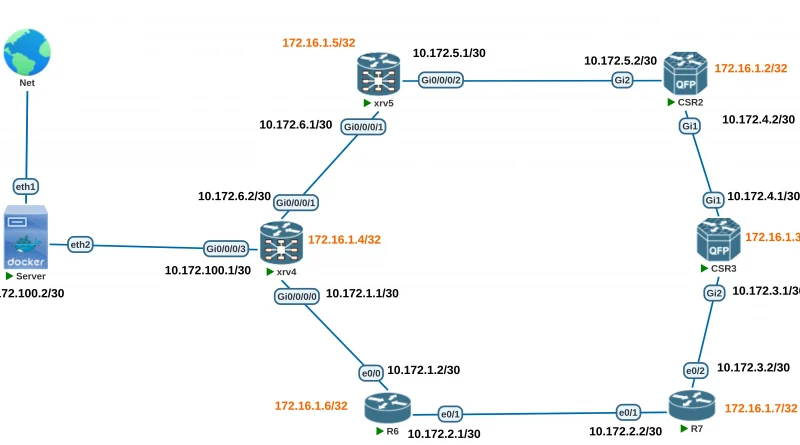
Network topology that used as below

Enabling SSH on CISCO IOS as below, in configuration mode
line vty 0 4
login local
transport input all
enable secret cisco
ip domain name devnet
username cisco password cisco
crypto key generate rsa
Enabling SSH on CISCO IOS-XR as below, in configuration mode.
domain name devnet
line default
transport input all
ssh server v2
and generate rsa key in global mode using command as below
crypto key generate rsa
Please enter 2048 after generating RSA Key, currently 2048 bit is acceptable. RSA key below 1024 should avoid but larger key size also take longer to calculate. In addition for CISCO IOS, for entering configuration mode while using ssh must be enable secret key and login local configuration. Notes: all credentials that used is only for lab, and for better security terms the transport input parameter should be changed to ssh only.
The sample script for display and do the configuration changing use as network automation netmiko. This script is use for displaying IP information for every interface and do the configuration for add new loopback interface with IP Address 1.1.1.1/32. The first thing to do is declaring the device type that used by create the dictionary format, in this article called iosv_l3 and the device type is cisco_ios.
net_connect = establishing ssh connection to device
send_command() = retrieve information by executing show command
send_config_set() = do some configuration changing
net_connect.enable() = entering Privileged EXEC mode
ios-netmiko1.py
from netmiko import ConnectHandler

iosv_l3 = {
'device_type': 'cisco_ios',
'ip': '172.16.1.6',
'username': 'cisco',
'password': 'cisco',
'secret': 'cisco'
}

net_connect = ConnectHandler(**iosv_l3)
net_connect.enable()
output = net_connect.send_command('show ip int brief')
print (output)

config_commands = ['int loop 10', 'ip address 1.1.1.1 255.255.255.255']
output = net_connect.send_config_set(config_commands)
print (output)
Result Network Automation Netmiko
root@Server:/home/admin/devnet# python3 ios-netmiko1.py
Interface IP-Address OK? Method Status Protocol
Ethernet0/0 10.172.1.2 YES manual up up
Ethernet0/1 10.172.2.1 YES manual up up
Ethernet0/2 unassigned YES TFTP up up
Ethernet0/3 unassigned YES TFTP up up
Loopback0 172.16.1.6 YES manual up up
configure terminal
Enter configuration commands, one per line. End with CNTL/Z.
R6(config)#int loop 10
R6(config-if)#ip address 1.1.1.1 255.255.255.255
R6(config-if)#end
R6#
root@Server:/home/admin/devnet#