Automating Multi Vendor Devices with Netmiko
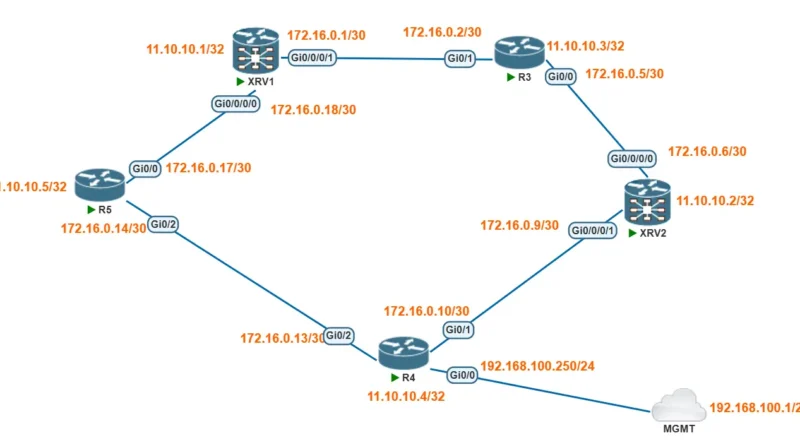
Netmiko is one of the most popular Python library that used for network automation. In the previous post already discuss about automating multiple device using netmiko. On that post the automation used for same command with the same device type. In this post, we will first explore how to automate configurations using Netmiko across multiple devices, each requiring different commands. On the next post, we will demonstrate how to execute these automations simultaneously by implementing multithreading. Network automation in this post using netmiko that running on pyhton version 3. Device type that used is Cisco IOS-XE and Cisco IOS-XR. The automation to show OSPF configuration and verifiy adjacency.

First, create a device definitiong. Device definition using list and dictionary. There are 5 devices in this, so device defination in python as below. The dictionary contain all the required parameters for Netmiko’s cnnectHandler() funtion to establish SSH to network devices. The required parameter define in key at dictionary, which is device_type, ip, username, and password. Device definition as below is have a weakness because of low security because the username and password is define in cleartext.
XRV1 = {
    'device_type': 'cisco_xr',
    'ip': '11.10.10.1',
    'username': 'admin',
    'password': 'password',
}

XRV2 = {
    'device_type': 'cisco_xr',
    'ip': '11.10.10.2',
    'username': 'admin',
    'password': 'password',
}
R3 = {
    'device_type': 'cisco_ios',
    'ip': '11.10.10.3',
    'username': 'cisco',
    'password': 'cisco',
}

R4 = {
    'device_type': 'cisco_ios',
    'ip': '11.10.10.4',
    'username': 'cisco',
    'password': 'cisco',
}
R5 = {
    'device_type': 'cisco_ios',
    'ip': '11.10.10.5',
    'username': 'cisco',
    'password': 'cisco',
}

all_devices =  [XRV1,XRV2,R3,R4,R5]
After that, define command mapping dictionary. This command mapping dictionary will map command with appropriate vendor or OS type. This vendor or OS type will match on device defintion in key device_type for each variable of dictionary. The automation show the ospf configuration and verifying ospf adjacency. Cisco IOS-XE and Cisco IOS-XR use different commands to display configuration and verify OSPF adjacency. To show configuration specific to OSPF, IOS-XE uses show running-config | s ospf, while IOS-XR uses show running-config router ospf. For verifying OSPF adjacency, the command on IOS-XE is show ip ospf neighbor, whereas IOS-XR uses the same command: show ip ospf neighbor.
command_list = {
    'cisco_ios': ['show running-config | s ospf','show ip ospf neighbor'],
    'cisco_xr': ['show running-config router ospf','show ospf neighbor']
}
After that, create iteration through the list from device definition, where each device is dictionary XRV1, XRV2, R3, R4, and R5. After connect to each device, it will map commands with appropriate vendor or OS type. If the script doesn’t find the device type, it returns an empty list ([]) to avoid errors.
for device in all_devices:
    print(f"\nConnecting to ({device['ip']})")
    try:
        net_connect = ConnectHandler(**device)
        cli = command_list.get(device['device_type'], [])
After command already map dynamically based on device type, create a new loops for sending command. The output is displayed on the terminal.
    for cli in cli:
        output = net_connect.send_command(cli)
        print(f"\n Output of '{cli}' on {device['ip']}:\n{output} ")
    print(f"\n##############################################")
You can use the datetime module to calculate the execution time when automating multiple vendors in sequence.
from datetime import datetime
start_time = datetime.now()
end_time = datetime.now()
print('\n Duration: {}'.format(end_time - start_time))
Result
Output of this automation and duration
Connecting to (11.10.10.1)

 Output of 'show running-config router ospf' on 11.10.10.1:

Sat Jul 19 19:04:34.612 UTC
router ospf 100
 router-id 11.10.10.1
 mpls ldp sync
 address-family ipv4 unicast
 area 0
  interface Loopback0
   passive enable
  !
  interface GigabitEthernet0/0/0/0
  !
  interface GigabitEthernet0/0/0/1
  !
 !
!


 Output of 'show ospf neighbor' on 11.10.10.1:

Sat Jul 19 19:04:35.123 UTC

* Indicates MADJ interface
# Indicates Neighbor awaiting BFD session up

Neighbors for OSPF 100

Neighbor ID     Pri   State           Dead Time   Address         Interface
11.10.10.5      1     FULL/DR         00:00:38    172.16.0.17     GigabitEthernet0/0/0/0
    Neighbor is up for 2w0d
11.10.10.3      1     FULL/BDR        00:00:38    172.16.0.2      GigabitEthernet0/0/0/1
    Neighbor is up for 2w0d

Total neighbor count: 2

##############################################

Connecting to (11.10.10.2)

 Output of 'show running-config router ospf' on 11.10.10.2:

Sat Jul 19 19:04:37.774 UTC
router ospf 100
 router-id 11.10.10.2
 mpls ldp sync
 address-family ipv4 unicast
 area 0
  interface Loopback0
   passive enable
  !
  interface GigabitEthernet0/0/0/0
  !
  interface GigabitEthernet0/0/0/1
  !
 !
!


 Output of 'show ospf neighbor' on 11.10.10.2:

Sat Jul 19 19:04:38.187 UTC

* Indicates MADJ interface
# Indicates Neighbor awaiting BFD session up

Neighbors for OSPF 100

Neighbor ID     Pri   State           Dead Time   Address         Interface
11.10.10.3      1     FULL/BDR        00:00:34    172.16.0.5      GigabitEthernet0/0/0/0
    Neighbor is up for 2w0d
11.10.10.4      1     FULL/DR         00:00:31    172.16.0.10     GigabitEthernet0/0/0/1
    Neighbor is up for 2w0d

Total neighbor count: 2

##############################################

Connecting to (11.10.10.3)

 Output of 'show running-config | s ospf' on 11.10.10.3:
router ospf 100
 router-id 11.10.10.3
 passive-interface Loopback0
 network 11.10.10.3 0.0.0.0 area 0
 network 172.16.0.0 0.0.0.3 area 0
 network 172.16.0.4 0.0.0.3 area 0

 Output of 'show ip ospf neighbor' on 11.10.10.3:

Neighbor ID     Pri   State           Dead Time   Address         Interface
11.10.10.2        1   FULL/DR         00:00:36    172.16.0.6      GigabitEthernet0/0
11.10.10.1        1   FULL/DR         00:00:36    172.16.0.1      GigabitEthernet0/1

##############################################

Connecting to (11.10.10.4)

 Output of 'show running-config | s ospf' on 11.10.10.4:
router ospf 100
 router-id 11.10.10.4
 passive-interface Loopback0
 network 11.10.10.4 0.0.0.0 area 0
 network 172.16.0.8 0.0.0.3 area 0
 network 172.16.0.12 0.0.0.3 area 0
 network 192.168.100.0 0.0.0.255 area 0

 Output of 'show ip ospf neighbor' on 11.10.10.4:

Neighbor ID     Pri   State           Dead Time   Address         Interface
11.10.10.5        1   FULL/DR         00:00:37    172.16.0.14     GigabitEthernet0/2
11.10.10.2        1   FULL/BDR        00:00:32    172.16.0.9      GigabitEthernet0/1

##############################################

Connecting to (11.10.10.5)

 Output of 'show running-config | s ospf' on 11.10.10.5:
router ospf 100
 router-id 11.10.10.5
 passive-interface Loopback0
 network 11.10.10.5 0.0.0.0 area 0
 network 172.16.0.12 0.0.0.3 area 0
 network 172.16.0.16 0.0.0.3 area 0

 Output of 'show ip ospf neighbor' on 11.10.10.5:

Neighbor ID     Pri   State           Dead Time   Address         Interface
11.10.10.1        1   FULL/BDR        00:00:38    172.16.0.18     GigabitEthernet0/0
11.10.10.4        1   FULL/BDR        00:00:39    172.16.0.13     GigabitEthernet0/2

##############################################

 Duration: 0:00:15.364876
Wow, this website is so helping me for studying network. Thank you